Fast & Simple
XA Downloader lets you paste an Instagram link and access your content with a simple, straightforward workflow.


Save Instagram photos in high quality with XA Downloader. Download a single image or multiple photos from a public Instagram carousel and save them directly to your device. No Instagram login, account, or app is required.
Fast, simple and reliable tools for saving public Instagram content — without accounts, apps or complicated steps.
XA Downloader lets you paste an Instagram link and access your content with a simple, straightforward workflow.
Download public Instagram content without subscriptions or hidden charges.
No account creation, email address or Instagram login is required.
We do not ask for your Instagram password or require access to your account.
Use XA Downloader comfortably on phones, tablets, laptops and desktops.
Everything works online in your browser. Nothing to install or update.
Download Instagram photos in three simple steps. No app, account, or complicated setup required.
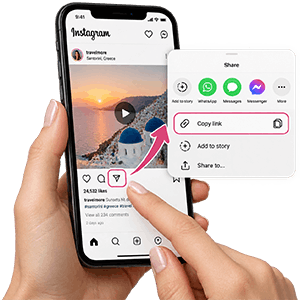
Open Instagram, find the photo you want to save.tap Share, then select Copy Link.
Paste the copied Instagram photo link into XA Downloader.
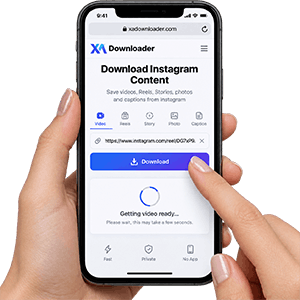
Click the download button and save the photo in available quality.


XA Downloader makes it easy to download public Instagram photos directly from your browser. You can save Instagram images quickly and conveniently without installing any app, creating an account, or logging in to Instagram.
The tool works smoothly on smartphones, tablets, and desktop computers, allowing you to save your favorite Instagram photos anytime and anywhere.
Whether you want to keep inspiring images, product photos, creative posts, or memorable moments, XA Downloader provides a simple and reliable way to save Instagram photos with ease. The service is designed for publicly available content only, so private or restricted photos cannot be downloaded.
Download Instagram videos, stories, photos, and other content easily with XA Downloader's online tools.
Download Instagram Reels videos online.
Save Instagram videos quickly and easily.
Download Instagram Stories from public links.
Save Instagram photos in high quality.
Copy captions from Instagram posts easily.
Explore the latest articles from XA Downloader and learn more about Instagram downloads and tools.

Introduction: Your Reel Has Only 3 Seconds to Win Attention Every day, millions of Instagram Reels compete for attention. But most users decide w...
Read article
Is your Instagram Explore page suddenly filled with random memes, irrelevant Reels, topics you don’t care about, or content you wish would ...
Read article
You find the perfect Instagram Reel—maybe it’s a tutorial you want to watch later, a travel clip you want to keep for inspiration, or a video...
Read articleCopy the link of a public Instagram photo post, paste it into XA Downloader, and click the download button. The available image will be prepared for saving directly to your device without requiring an app or Instagram login.
Yes. XA Downloader does not require your Instagram username, password, or account access. You only need the link of a publicly available Instagram photo post.
Yes, supported Instagram carousel posts can contain multiple images. If the carousel is publicly available and accessible, XA Downloader can help you save the available photos from the post.
Downloaded images are provided in the best available quality that can be accessed from the original Instagram post. The final resolution depends on the image uploaded to Instagram and the quality available from the source.
No. XA Downloader only works with publicly available Instagram content. Photos from private accounts or posts that require Instagram access cannot be downloaded.
Yes. XA Downloader works directly in your browser and can be used on iPhone, Android devices, tablets, and computers without installing additional software.
A photo may not download if the link is incorrect, the post has been deleted, the account is private, or the content is no longer publicly available. Make sure you copied the complete Instagram post URL and try again.
No. XA Downloader does not add its own logo, watermark, or overlay to downloaded images. Any watermark, text, or branding that exists in the original Instagram post will remain part of the image.
XA Downloader supports links to publicly available Instagram photo posts. Copy the complete post URL from Instagram and paste it into the downloader. If the link cannot be processed, check that the post is still available publicly.
XA Downloader is designed for downloading publicly available Instagram photo posts. Profile picture downloading depends on whether this feature is supported separately by the tool.
Downloaded photos are usually saved in your browser's default Downloads folder. On iPhone or iPad, files can typically be found through the Files app, while Android and desktop browsers usually save them in the Downloads folder.
XA Downloader does not require your Instagram login information. You should never enter your Instagram username or password into any third-party downloader tool. Information about temporary processing, storage, and data handling should be available in the site's Privacy Policy.
You should only download Instagram photos that you own, have permission to use, or are allowed to save. Respect the rights of content creators and follow applicable copyright laws and Instagram's terms when using downloaded images.