Fast & Simple
XA Downloader lets you paste an Instagram link and access your content with a simple, straightforward workflow.

Copy Instagram captions, hashtags, and mentions in seconds with XA Downloader. Paste a public Instagram post or Reel link to extract the available caption text and copy it instantly — no login, account, or app required.
Fast, simple and reliable tools for saving public Instagram content — without accounts, apps or complicated steps.
XA Downloader lets you paste an Instagram link and access your content with a simple, straightforward workflow.
Download public Instagram content without subscriptions or hidden charges.
No account creation, email address or Instagram login is required.
We do not ask for your Instagram password or require access to your account.
Use XA Downloader comfortably on phones, tablets, laptops and desktops.
Everything works online in your browser. Nothing to install or update.
Copy Instagram captions in three simple steps. No app, account, or complicated setup required.
Open Instagram, find the post with the caption you want to copy, tap Share, and copy the post link.
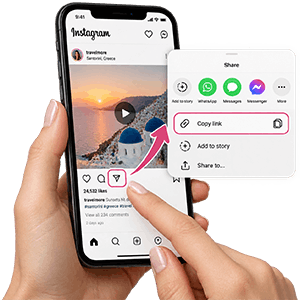
Paste the Instagram link into XA Downloader. We extract the caption text instantly.
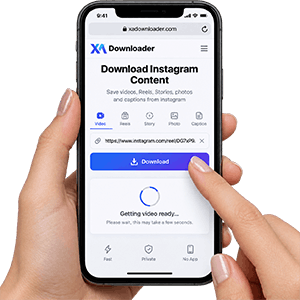
Copy the caption, hashtags, and emojis with one click


XA Downloader makes it simple to copy Instagram captions directly from your browser. You can extract captions, hashtags, and text from public Instagram posts without installing an app, creating an account, or logging in to Instagram.
The tool works across mobile devices, tablets, and desktop computers, making it easy to access and copy Instagram captions whenever you need.
Whether you want to save useful information, reuse hashtags, collect ideas, or keep important post text, XA Downloader provides a fast and convenient way to copy Instagram captions. The service is designed for publicly available content only, and private or restricted posts cannot be accessed.
Download Instagram videos, stories, photos, and other content easily with XA Downloader's online tools.
Download Instagram Reels videos online.
Save Instagram videos quickly and easily.
Download Instagram Stories from public links.
Save Instagram photos in high quality.
Copy captions from Instagram posts easily.
Explore the latest articles from XA Downloader and learn more about Instagram downloads and tools.
Find answers to the most common questions about XA Downloader and downloading Instagram content.
Copy the link of a public Instagram post or Reel, paste it into XA Downloader, and click the copy caption button. The available caption text will be extracted and ready to copy.
Yes. XA Downloader does not require your Instagram username, password, or account login. You only need the link of a publicly available Instagram post or Reel.
Yes. Supported public Instagram Reels can have their captions copied using XA Downloader. Paste the Reel link into the tool and extract the available caption text.
Yes. When available, XA Downloader copies the caption text along with included emojis, hashtags, and line breaks from the original Instagram post.
No. XA Downloader only works with publicly available Instagram content. Captions from private accounts or posts that require Instagram access cannot be accessed.
Yes. Public Instagram photo posts and supported carousel posts can be processed if their caption information is available.
A caption may not be available if the post has been deleted, the account is private, the URL is incorrect, or the content is not publicly accessible. Check the link and make sure the post can be viewed publicly before trying again.
XA Downloader supports links to publicly available Instagram posts and Reels. Copy the complete Instagram URL and paste it into the caption tool to extract the available text.
Yes. XA Downloader works directly in your browser and can be used on smartphones, tablets, and computers without installing an app or browser extension.
XA Downloader does not require your Instagram login information. You should never enter your Instagram password into any third-party tool. Information about data processing and storage should be available in the site's Privacy Policy.
You should respect the rights of content creators when using copied captions. Captions may be protected by copyright depending on their originality and intended use. Use copied content responsibly and obtain permission when necessary.