You find the perfect Instagram Reel—maybe it’s a tutorial you want to watch later, a travel clip you want to keep for inspiration, or a video you have permission to use in your next edit. You tap around Instagram looking for a simple way to save the actual file, but the option you need isn’t there. Sound familiar?
That’s exactly why Instagram downloader websites remain useful.
While Instagram now provides a built-in download option for some Reels, it doesn’t cover every type of content or every situation. If you want to save Instagram photos, Stories, Highlights, carousel media, or multiple files directly to your device, a browser-based Instagram downloader can offer more flexibility.
In this guide, we’ll look at some of the best Instagram downloader websites, including popular tools such as SnapInsta, iGram, Inflact, FastDL, and XA Downloader. We’ll also explain why people still use Instagram downloaders even though Instagram has introduced its own Reel download feature.
Why Do People Use Instagram Downloaders?
Instagram already lets you save posts inside the app, so why would you need an Instagram downloader?
Because saving a post on Instagram and downloading the actual media file to your device are two different things.
When you use Instagram’s Save feature, the post is bookmarked inside your Instagram account. You still need Instagram—and usually an internet connection—to access it.
An Instagram downloader, on the other hand, can save the actual supported media file to your phone, tablet, or computer.
That can be useful for several reasons.
Save the Actual File to Your Device
One of the biggest reasons people use Instagram downloaders is simple: they want a real media file stored on their device.
Instead of keeping only a bookmark inside Instagram, you can save supported photos or videos locally and access them from your gallery or downloads folder.
A good downloader should also preserve the best available quality rather than forcing you to rely on screenshots or screen recordings.
Watch Content Offline
Want to save a tutorial before a flight? Keep a workout video available where your connection is unreliable? Or collect reference material for later?
Downloading content allows you to access saved files without opening Instagram every time.
This can be especially convenient when traveling, commuting, or working somewhere with limited internet access.
Keep a Personal Backup
Instagram posts can be deleted, accounts can change, and content you bookmarked may not always remain available.
For content you own—or content you have permission to save—keeping a local backup gives you an additional copy on your own device.
Creators can also use downloads to maintain personal archives of their published content.
Use Media in Video Editing and Creative Projects
Creators, editors, social media managers, and marketers sometimes need Instagram media as source material for editing workflows.
Having the actual file on your computer or phone makes it easier to import permitted content into video-editing software, create compilations, prepare presentations, or work on other creative projects.
Of course, downloading a file does not give you ownership of someone else’s content. Always respect copyright, privacy, licensing terms, and the original creator’s rights before reposting, editing, or commercially using downloaded media.
Instagram Already Lets You Download Reels—So Why Use a Downloader?
Instagram has introduced native downloading for eligible Reels, which is useful for many users.
However, Instagram’s built-in downloading feature is primarily focused on Reels rather than providing a universal download button for every Instagram photo, Story, Highlight, carousel, or other type of media.
Native Reel downloads may also include Instagram attribution, such as creator identification, and download availability can depend on the creator’s settings.
That leaves several reasons why third-party Instagram downloader websites are still popular.
Users may be looking for:
- Watermark-free downloads when available
- Instagram Story downloads
- Instagram photo downloads
- Highlight downloads
- Downloads of publicly accessible content where Instagram’s native download button is unavailable
- Carousel and multi-file downloads
- The ability to save several media files more efficiently
- A browser-based solution without installing another app
- In other words, Instagram’s native download feature is useful, but it doesn’t necessarily replace a dedicated Instagram downloader for every use case.
Best Instagram Downloader Websites
There are many Instagram downloading tools online, and their features can change over time. The best choice depends on what you want to download, whether you prefer a simple downloader or a larger social media toolkit, and whether features such as Stories, Highlights, photos, or multiple-file downloads matter to you.
Here are several Instagram downloader websites worth knowing.
1. XA Downloader
XA Downloader is an online nstagram downloader designed around a simple idea: paste a public Instagram link and save the available media without installing software or creating an account.
It is particularly useful for users who want more than a basic one-file-at-a-time workflow because XA Downloader supports downloading multiple available files, making it convenient for posts containing several media items.
Why Use XA Downloader?
⚡ Fast Downloads
XA Downloader is designed to process Instagram content quickly from supported public links, so you can spend less time waiting and more time using the files you need.
📦 Multiple-File Downloads
Need more than one file? XA Downloader supports downloading multiple available media files, which can make saving multi-item Instagram content much more convenient.
🆓 100% Free
There are no subscription fees or hidden charges required to use the downloader.
👤 No Registration Required
You don’t need to create an XA Downloader account just to download Instagram content.
✨ High-Quality Downloads
XA Downloader aims to provide Instagram media in the best available quality from the source.
📱 No App Installation
Everything works through your web browser. There’s no need to install another app on your phone or computer.
💻 Works Across Devices
You can use XA Downloader from a smartphone, tablet, laptop, or desktop computer.
🔒 No Instagram Login Required
XA Downloader does not require your Instagram username or password to process supported public links.
That’s particularly important when choosing a third-party downloader: you should be cautious about entering Instagram credentials into unrelated websites.
🛡️ No Link or File Storage
According to XA Downloader’s privacy approach, submitted links and downloaded files are not stored on the website.
For users who value a straightforward, browser-based workflow, XA Downloader combines the essential Instagram downloading features with multi-file support and no-registration access.

2. SnapInsta
SnapInsta is another recognizable name in the Instagram downloader space. It uses the familiar copy-and-paste workflow: copy the Instagram URL, paste it into the downloader, and select the available download option.
Its browser-based approach makes it convenient for people who don’t want to install additional software.
SnapInsta is commonly associated with downloading formats such as Instagram Reels, videos, and photos, although supported features can change as Instagram and third-party services evolve.
3. savefrom
savefrom is a web-based Instagram downloader focused on keeping the downloading process simple.
Like other online downloaders, it is useful for users who prefer to paste an Instagram link into a website instead of installing a dedicated downloader application.
4. snapgram
snapgram is somewhat different from basic Instagram downloaders because downloading is only one part of its broader collection of Instagram and social media tools.
That can make snapgram interesting for creators, marketers, and social media professionals who want access to additional Instagram-related utilities alongside downloading functionality.
If your only goal is downloading a file as quickly as possible, however, you may prefer a more focused tool with fewer steps.
5. FastDL
FastDL is another popular browser-based option built around a straightforward link-based downloading process.
Its appeal is simplicity: users looking for a quick way to process an Instagram link can do so directly through a web browser rather than installing dedicated software.
As with any third-party Instagram downloader, supported content types and functionality can change, so it is always worth checking the tool’s current capabilities.
What Should You Look for in an Instagram Downloader?
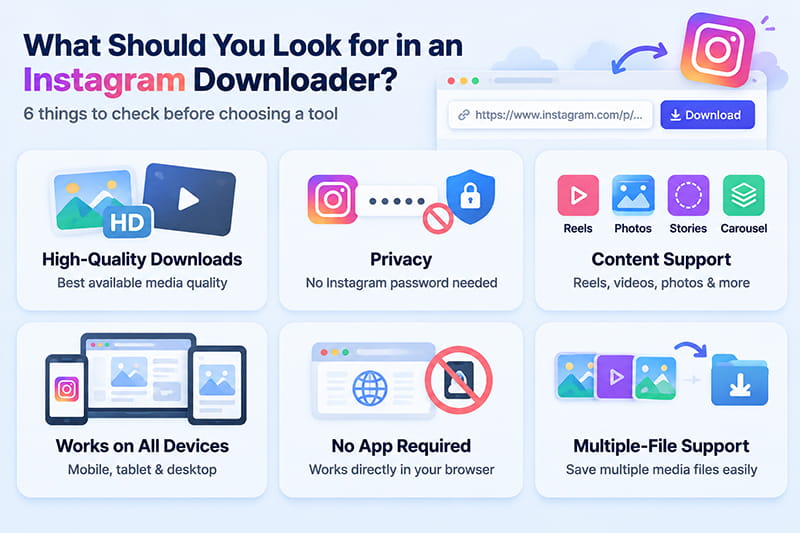
Not every downloader offers the same experience. Before using one, consider a few important factors.
Download quality: Look for a service that provides the best available media quality rather than unnecessarily compressing the file.
Privacy: A basic public-content downloader generally shouldn’t need your Instagram password. Be cautious with websites that unexpectedly request account credentials.
Supported content: If you need more than Reels, check whether the downloader also supports the content types you use, such as photos, Stories, Highlights, or multi-item posts.
Device compatibility: A good online Instagram downloader should work smoothly on iPhone, Android, Windows, macOS, tablets, and other modern devices through a web browser.
No unnecessary installation: Browser-based downloaders let you save media without adding another application or browser extension.
Multiple-file support: If you frequently work with carousel posts or several media files, a downloader with multi-file functionality can save considerable time.
Is It Safe to Use an Instagram Downloader?
Safety depends heavily on the website you choose.
A useful rule is to avoid giving a third-party downloader your Instagram password, authentication code, or other sensitive account information unless there is a legitimate and clearly explained reason.
For ordinary public-link downloading, tools that work without an Instagram login reduce the need to share account credentials.
XA Downloader, for example, is designed to work without requiring an Instagram username or password, and it states that submitted links and downloaded files are not stored on the website.
You should also avoid suspicious download buttons, unexpected software installations, and browser extensions from sources you don’t trust.
Can You Download Content from Private Instagram Accounts?
A standard web-based Instagram downloader should not be treated as a way to bypass Instagram’s privacy controls.
If an account or piece of content is private or otherwise inaccessible to the downloader, it may not be available for download.
However, this is different from a public Reel whose creator has simply disabled Instagram’s built-in download option. Some third-party tools may still be able to process publicly accessible media even when Instagram itself does not display a native download button.
Availability ultimately depends on the content, its privacy settings, and the downloader being used.
Can You Repost Downloaded Instagram Content?
Downloading content and having permission to reuse it are not the same thing.
Photos and videos remain subject to the rights of their creators and other applicable copyright, privacy, trademark, and licensing rules.
If you want to repost, edit, redistribute, or commercially use content created by someone else, make sure you have the appropriate permission or legal right to do so.
For personal backups and editing workflows, using your own content—or media you have explicit permission to use—is the safest approach.
Final Thoughts: Which Instagram Downloader Should You Use?
Instagram’s built-in Reel downloading feature is convenient when it’s available, but it doesn’t cover every reason people want to save Instagram media.
Sometimes you need the actual file on your device. Sometimes you want to watch something offline. You may need to save a photo, Story, Highlight, or several media files—or you may simply want a browser-based solution that doesn’t require installing another app.
Tools such as SnapInsta, iGram, Inflact, and FastDL provide different approaches to Instagram downloading, while XA Downloader focuses on a fast, free, no-registration experience with high-quality downloads and support for multiple files.
Ready to Save Instagram Content?
If you have a public Instagram link you want to save, try XA Downloader.
Copy the Instagram link, paste it into XA Downloader, and download the available media directly to your device—fast, free, and without creating an account or sharing your Instagram password.
Try XA Downloader and save the Instagram content you need in just a few clicks.